




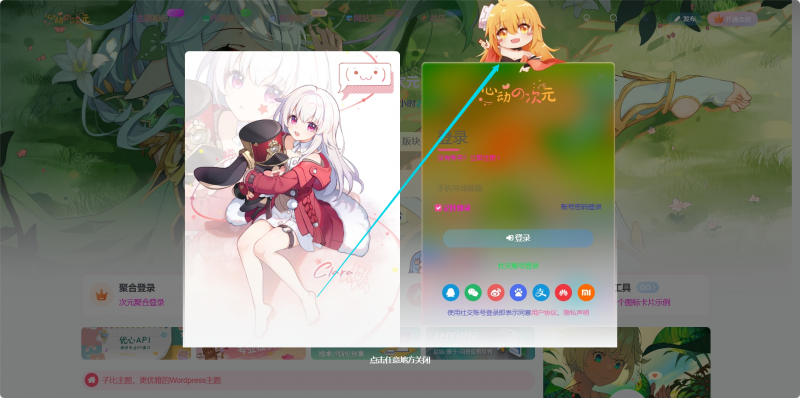
![图片[1] - WordPress文章美化段落渐变背景样式教程 - 狐狸资源网](https://yk2.fenx.top/e/67d67d982cfe66c45c7795e8e2c29a06.png)
教程
<title>WordPress文章段落渐变背景样式教程</title>
    <style>
        * {
            margin: 0;
            padding: 0;
            box-sizing: border-box;
            font-family: 'Segoe UI', 'PingFang SC', 'Microsoft YaHei', sans-serif;
        }

h1 {
            font-size: 2.8rem;
            margin-bottom: 15px;
            background: linear-gradient(45deg, #6c5ce7, #fd79a8);
            -webkit-background-clip: text;
            background-clip: text;
            color: transparent;
            text-shadow: 2px 2px 8px rgba(0, 0, 0, 0.1);
        }

.divider {
            height: 3px;
            background: linear-gradient(90deg, transparent, #6c5ce7, transparent);
            margin: 30px 0;
            border: none;
        }
        /* 内容区域 */
        .content-section {
            margin-bottom: 50px;
        }
        .section-title {
            font-size: 1.8rem;
            margin-bottom: 20px;
            color: #6c5ce7;
            display: flex;
            align-items: center;
        }
        .section-title i {
            margin-right: 10px;
            background: linear-gradient(45deg, #6c5ce7, #fd79a8);
            -webkit-background-clip: text;
            background-clip: text;
            color: transparent;
        }
        .section-content {
            line-height: 1.8;
            margin-bottom: 20px;
        }
        /* 渐变段落样式 */
        .gradient-paragraph {
            margin-bottom: 30px;
            padding: 25px;
            border-radius: 12px;
            line-height: 1.8;
            font-size: 1.6rem;
            transition: all 0.3s ease;
            box-shadow: 0 5px 15px rgba(0, 0, 0, 0.08);
        }
        .gradient-paragraph:hover {
            transform: translateY(-5px);
            box-shadow: 0 10px 25px rgba(0, 0, 0, 0.15);
        }
        /* 渐变样式 */
        .gradient-1 {
            background: linear-gradient(135deg, #a8edea 0%, #fed6e3 100%);
            color: #4a4a4a;
            border-left: 5px solid #6c5ce7;
        }
        .gradient-2 {
            background: linear-gradient(135deg, #f5f7fa 0%, #c3cfe2 100%);
            color: #4a4a4a;
            border-left: 5px solid #4a69bd;
        }
        .gradient-3 {
            background: linear-gradient(135deg, #ffecd2 0%, #fcb69f 100%);
            color: #4a4a4a;
            border-left: 5px solid #e17055;
        }
        .gradient-4 {
            background: linear-gradient(135deg, #84fab0 0%, #8fd3f4 100%);
            color: #4a4a4a;
            border-left: 5px solid #00b894;
        }

        /* 提示框 */
        .tip {
            background: linear-gradient(135deg, #ffeaa7 0%, #fab1a0 100%);
            padding: 20px;
            border-radius: 10px;
            margin: 30px 0;
            border-left: 5px solid #e17055;
            position: relative;
        }
        .tip::before {
            content: '提示';
            position: absolute;
            top: -12px;
            left: 20px;
            background: #e17055;
            color: white;
            padding: 5px 15px;
            border-radius: 20px;
            font-size: 0.9rem;
            font-weight: bold;
        }
    </style>
<h1>WordPress文章段落渐变背景样式教程</h1>
<h2 class="section-title">WordPress渐变背景效果介绍</h2>
<div class="tip">
渐变背景不仅可以美化您的文章,还可以帮助引导读者的视线,强调重要内容,并创造更加愉悦的阅读体验。
</div>

<h2 class="section-title"><i class="fas fa-palette"></i> 渐变背景效果示例</h2>

<p class="gradient-paragraph gradient-2">
这是一个灰色渐变背景示例。中性色调适合各种内容类型,不会分散读者对文本的注意力,同时提供视觉上的区分。
</p>

<p class="gradient-paragraph gradient-3">
这是一个橙色渐变背景示例。温暖的颜色能够吸引读者的注意力,适合用于强调重要内容或警告信息。
</p>

<p class="gradient-paragraph gradient-1">
这是一个蓝色到粉色的渐变背景示例。柔和的色彩过渡创造出平静而优雅的效果,非常适合用于引言或重要提示内容。
</p>

<p class="gradient-paragraph gradient-4">
这是一个绿色渐变背景示例。清新的颜色让人联想到自然和成长,适合用于环保、健康或积极主题的内容。
</p>
子比专属
func.php代码如下放在最底部即可
// 渐变部分输出样式
function custom_gradient_styles() {
    ?>

    /* 渐变段落类名 */
    .grad-x1 { background: linear-gradient(135deg, #a8edea 0%, #fed6e3 100%); color: #4a4a4a; border-left:5px solid #6c5ce7; padding:20px; border-radius:12px; margin:20px 0; line-height:1.8; transition:all 0.3s ease; box-shadow:0 5px 15px rgba(0,0,0,0.08);}
    .grad-x1:hover { transform:translateY(-5px); box-shadow:0 10px 25px rgba(0,0,0,0.15);}
    .grad-x2 { background: linear-gradient(135deg, #f5f7fa 0%, #c3cfe2 100%); color:#4a4a4a; border-left:5px solid #4a69bd; padding:20px; border-radius:12px; margin:20px 0; line-height:1.8; transition:all 0.3s ease; box-shadow:0 5px 15px rgba(0,0,0,0.08);}
    .grad-x2:hover { transform:translateY(-5px); box-shadow:0 10px 25px rgba(0,0,0,0.15);}
    .grad-x3 { background: linear-gradient(135deg, #ffecd2 0%, #fcb69f 100%); color:#4a4a4a; border-left:5px solid #e17055; padding:20px; border-radius:12px; margin:20px 0; line-height:1.8; transition:all 0.3s ease; box-shadow:0 5px 15px rgba(0,0,0,0.08);}
    .grad-x3:hover { transform:translateY(-5px); box-shadow:0 10px 25px rgba(0,0,0,0.15);}
    .grad-x4 { background: linear-gradient(135deg, #84fab0 0%, #8fd3f4 100%); color:#4a4a4a; border-left:5px solid #00b894; padding:20px; border-radius:12px; margin:20px 0; line-height:1.8; transition:all 0.3s ease; box-shadow:0 5px 15px rgba(0,0,0,0.08);}
    .grad-x4:hover { transform:translateY(-5px); box-shadow:0 10px 25px rgba(0,0,0,0.15);}

    /* 提示框类名 */
    .tip-bx { background: linear-gradient(135deg, #ffeaa7 0%, #fab1a0 100%); padding:20px; border-radius:10px; margin:30px 0; border-left:5px solid #e17055; position:relative;}
    .tip-bx::before { content:'提示'; position:absolute; top:-12px; left:20px; background:#e17055; color:#fff; padding:5px 15px; border-radius:20px; font-size:0.9rem; font-weight:bold;}

    <?php
}
add_action('wp_head', 'custom_gradient_styles');

// ----------------------------
// 渐变段落短代码 s1-s4
// ----------------------------
function gradient_shortcode_factory($atts, $content, $class_name) {
    return ''.do_shortcode($content).'';
}
add_shortcode('s1', function($atts, $content){ return gradient_shortcode_factory($atts, $content, 'grad-x1'); });
add_shortcode('s2', function($atts, $content){ return gradient_shortcode_factory($atts, $content, 'grad-x2'); });
add_shortcode('s3', function($atts, $content){ return gradient_shortcode_factory($atts, $content, 'grad-x3'); });
add_shortcode('s4', function($atts, $content){ return gradient_shortcode_factory($atts, $content, 'grad-x4'); });

// ----------------------------
// 提示框短代码 b1
// ----------------------------
function tip_shortcode($atts, $content = null) {
    return ''.do_shortcode($content).'';
}
add_shortcode('b1', 'tip_shortcode');
?>
后台编辑直接替换短代码中间文字即可
![图片[2] - WordPress文章美化段落渐变背景样式教程 - 狐狸资源网](https://yk2.fenx.top/e/6243b27be0880249557c2483efc355ab.png)

© 版权声明
免责声明:本站是非经营性网站,网站资源部分收集整理于互联网,其著作权归原作者所有,如果有侵犯您权利的资源,请来信告知:foxccs@163.com,我们将及时撤销相应资源。
请于下载后24小时内删除,不允许用于商业用途,否则法律问题自行承担。
THE END





![子比友链检测及api接口[修复版] - 狐狸资源网](https://www.foxccs.com/wp-content/uploads/2024/07/image-19-702x550.png)























暂无评论内容